Inventory control across orders and locations
Know what you can sell, what is committed and what is on the way.
Inventory management for small and mid-size distributors: connect stock, sales orders, warehouse locations and incoming purchases in one workspace.
Give sales, purchasing and the warehouse the same stock picture
A wholesale customer asks for 100 units while online orders are drawing from the same stock. Your salesperson needs to know what is available—not just what the last spreadsheet said. Convexity brings stock balances, order commitments and incoming purchases together so your team can check before making a promise.
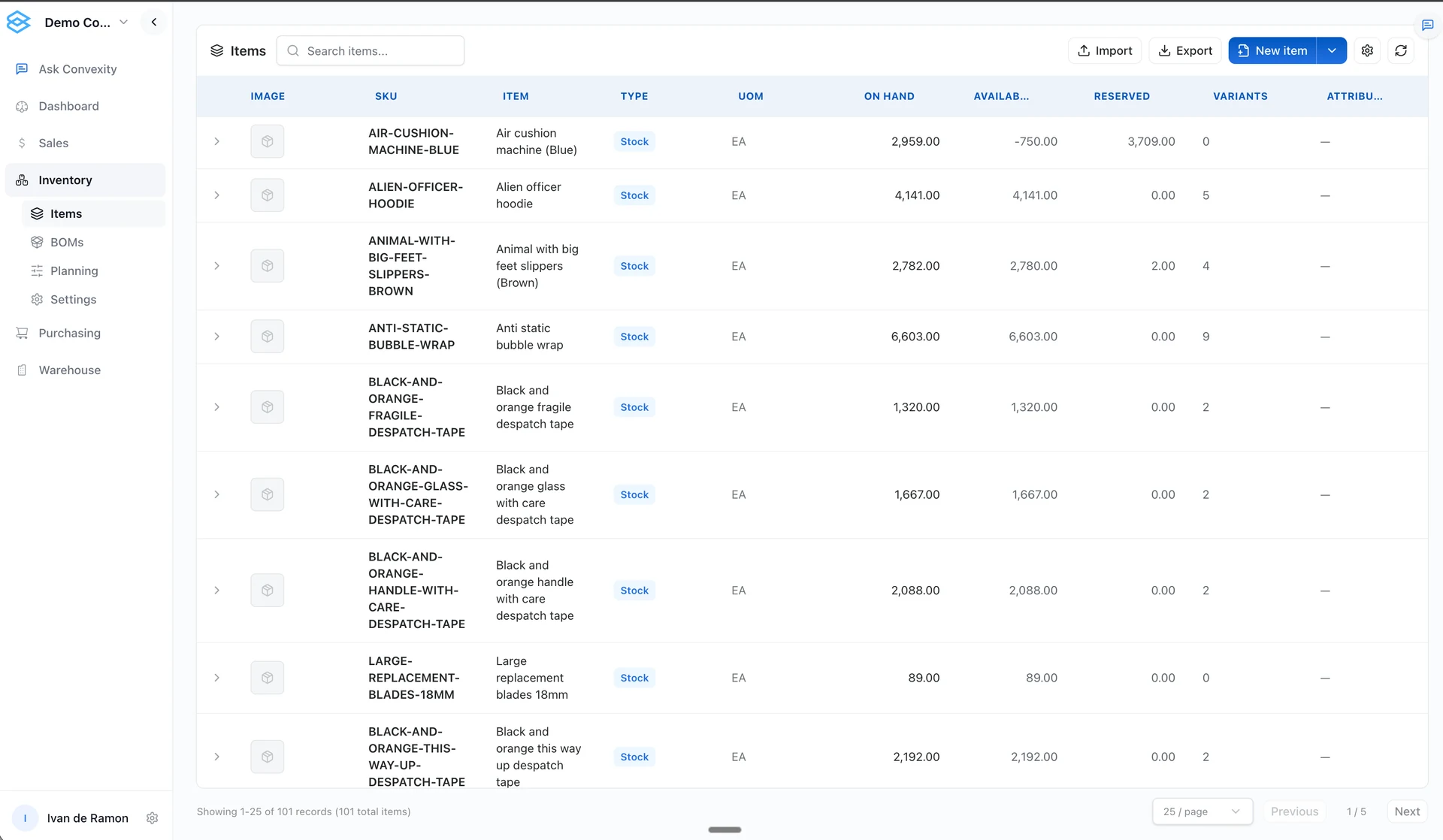
Manage product records and warehouse locations alongside sales and purchasing. Use inventory management to understand what you have today, then use demand forecasting and inventory optimization to decide what to buy next.
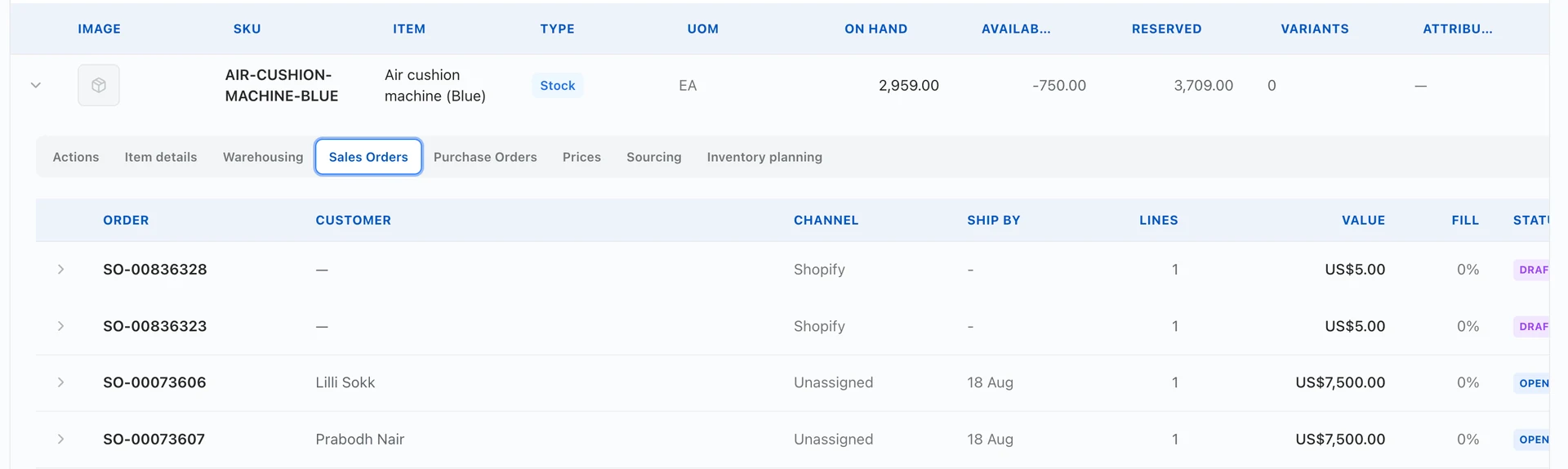
See the orders behind an item’s stock position
Open an item to review its related sales orders, customers, channels and order status. Keep the order detail beside the stock position so your team can investigate commitments rather than guessing from a total. Draft and confirmed orders remain distinct.
On hand, reserved, available and on order
On hand: stock recorded in the system. Reconcile it with physical counts; a recorded balance is not proof that every unit is sellable.
Reserved: stock committed through the reservation workflow. It is still on hand until the relevant stock movement occurs.
Available: in Convexity stock balances, on-hand quantity minus reserved quantity. Channel-specific availability may need additional rules for holds, locations or buffers.
On order: remaining stock-unit quantities on open warehouse-stock purchase orders, after quantities received. Draft and factory-direct purchase orders are not counted in that warehouse on-order total.
Compare the same SKU, unit and stock scope. Incoming purchases are tracked at item level and should not be read as stock already received at a particular bin. Connected systems may use different definitions, so map them before combining reports.
Example: why 100 units on hand does not mean 100 available
In this example, 30 of the 100 units on hand are reserved, leaving 70 available. A purchase order has another 50 units due. The table shows what changes when you receive 20 of them, assuming no other stock movements.
| Stock measure | Before receipt | After receiving 20 units |
|---|---|---|
| On hand | 100 | 120 |
| Reserved | 30 | 30 |
| Available (on hand − reserved) | 70 | 90 |
| On order (not yet received) | 50 | 30 |
Before receiving, the 50 incoming units do not increase current availability. After 20 units are received and the stock and purchase records are updated, on hand rises by 20 and the remaining on-order quantity falls by 20. Existing reservations still matter.
Connect stock to orders, locations and receiving
Maintain consistent item identifiers and units across your catalog and imported records.
Review stock balances with warehouse and location context where location tracking is configured.
Distinguish incoming purchases from completed receipts and review discrepancies before relying on the balance.
Check order commitments before promising stock to another customer.
Use inventory history and demand forecasts to investigate replenishment, rather than treating a current balance as a buying recommendation.
Keep wholesale and online stock decisions connected
If you sell through Shopify, Amazon, Walmart or Faire alongside wholesale, a total stock number is not enough. Decide how much inventory each channel can offer and which warehouse supplies it. Convexity supports channel-specific inventory allocation; we set up the supported connections and stock rules around your sales process.
Stock updates follow the connection and refresh schedule configured for each channel. We confirm these during onboarding, including how orders and cancellations affect availability.
When inventory management is the right starting point
Start here when teams disagree about what is available, receiving does not reconcile with purchase records, or stock is split across spreadsheets and systems. If the balances are already reliable but buyers need better quantities and timing, evaluate forecasting and inventory optimization instead.
Bring one SKU, an open sales order, a stock report and an incoming purchase. We will trace the quantities and identify the records and connections your workflow needs.
Book a demoFrequently asked questions
How is inventory management different from inventory optimization?
Inventory management records stock, reservations and movements. Inventory optimization uses demand, lead times and buying constraints to plan stock targets and replenishment. Reliable stock records are an input to that planning.
Can we manage stock across more than one warehouse?
Yes. Convexity tracks warehouses, locations and stock balances. During setup, we map your locations and agree how transfers, order commitments and channel allocations should work.
Does incoming stock count as available to sell?
Not in the on-hand-minus-reserved stock balance. On-order quantities remain separate until receipt and the relevant stock update. Preorder promises and expected delivery dates need their own agreed rules.
Can we start with a spreadsheet?
An agreed CSV or spreadsheet export can be used to map and import records. Start with consistent SKUs, units and stock definitions, then reconcile the imported balances. Ongoing synchronization is a separate integration requirement.
Start with your workflow
Bring one inventory, purchasing or order-management problem. We will map the required data, demonstrate the relevant workflow and identify what needs configuration or further validation.
Book a demo